How to Use Comments in Terraform
Learn how to use single-line and multi-line comments in Terraform, with best practices to keep your code clear, maintainable, and easy for teams to understand.


In any type of code, there are moments when comments are useful for adding context or clarification. They help others quickly understand the purpose behind your work, improving how they interact with the code and reducing confusion.
In this blog, we’ll look at the different types of comments you can use in Terraform and how they can help keep your code clear and maintainable.
Types of comments in Terraform
Terraform supports two main types of comments, both designed to help add context or explanations to your code.
Single-line comments: Start with a # or // and are used for brief explanations or disabling specific lines of code.
Multi-line comments: These are enclosed in a comment block between /* and */ and are using longer explanations or commenting out blocks of code.
Regardless of which type you use, Terraform ignores comments entirely—they have no impact on the execution of your code.
How to add single-line comments in Terraform files
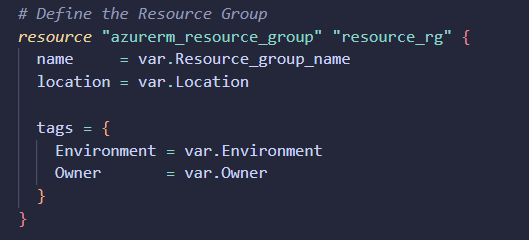
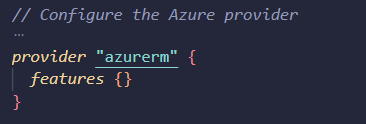
Single-line comments either start with a # or //. Both are supported, and you can use them interchangeably. Which one you use is entirely up to your personal preference. I personally use #.
Let’s look at some examples:
How to add multi-line comments in Terraform files
For multi-line comments, Terraform uses the standard /* ... */ syntax. Everything between these markers is treated as a comment and will not affect the execution of your code.
Let’s take a look at an example:
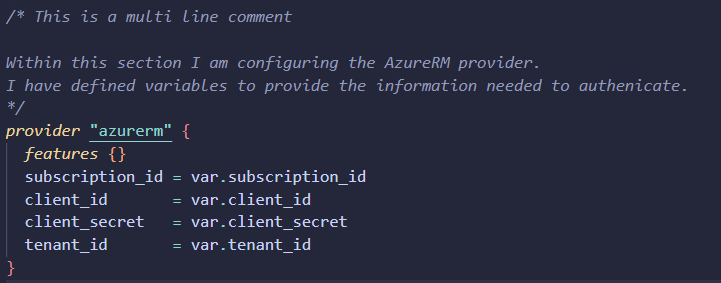
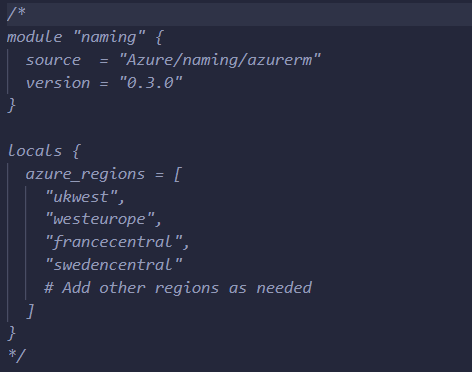
You can also use multi-line comments to temporarily disable code. In the example, you can see a section commented out, and my editor (VS Code) changes the text colour to make that visually clear.
- Estimate cloud costs with Terraform and Infracost
- What are Terraform modules and how to use them
Best practices for commenting in Terraform code
Comments can be powerful when used well, helping future you (and your teammates) make sense of decisions, processes, and intent behind certain configurations. Below are some best practices to help keep your Terraform code clean and understandable.
- Focus on intent: Your Terraform code should be mostly self-explanatory. Use comments only when they genuinely add value or explain decisions.
- Manual processes: Some configurations require manual steps. Use comments to flag any actions that need to happen before the code is executed, helping ensure nothing is overlooked..
- Avoid sensitive information: Never include passwords, API keys, or other sensitive information in comments.
- Avoid over commenting: Too many comments can clutter the code. Only include them where they genuinely help.
- Standardise the comment style: Use a consistent format for comments, especially when working in teams, to help reduce confusion.
Conclusion
Comments can improve efficiency and collaboration, making your Terraform code easier to understand and maintain. The key is finding the right balance, too few comments and helpful context is lost, too many and your code becomes harder to read.
Aim for a healthy balance between comments and documentation. Keep longer explanations in proper documentation, leaving your Terraform files clean, clear, and easy to follow.