Can you recover a deleted Microsoft Entra Tenant?
Wondering if a deleted Microsoft Entra tenant can be recovered? Discover what’s possible, what isn’t, and how to protect your identities.

A question I am often asked is:
“If our Microsoft Entra tenant was ever deleted — could we recover it?”
It’s an uncomfortable thought, isn’t it? It’s not a scenario anyone wants to think about, but it is something you do have to think about as we rely so heavily on identities being available and secure and the thought of them not being there could be disastrous.
So let’s take the fear out of this topic and break down what’s really possible — and what needs to be planned for.
The Reality: Deleted Tenants Don’t Come Back
Here’s the straightforward truth:
There is no restore option for a deleted Microsoft Entra tenant.
Once it’s gone, it’s gone. A tenant isn’t like a user account or group that has soft delete or recovery windows options.
But before panic sets in, there’s something important to understand:
Microsoft has made deleting a tenant purposely difficult.
To delete a tenant multiple checks and conditions must be met first. All bills and invoices must be paid for, no users are in the Entra tenant, if you are syncing users from on-premises must be turned off, all subscriptions for Azure, Microsoft 365 etc must be removed. It’s not something that a rogue admin can casually click into existence.
Those safeguards are outlined here in Microsoft’s official guidance: https://learn.microsoft.com/azure/active-directory/enterprise-users/directory-delete-howto#prepare-the-organization
Still, even a very small possibility means organisations must treat tenant protection as a critical cybersecurity responsibility.
Defending the Irreplaceable
There isn’t one magic setting that guarantees protection and that’s actually good news. Instead, there are different layers that can be put in place to defend against the exact scenario we worry about. Those layers include:
- Break-glass accounts locked down with strict policies
- Privilege elevation that expires after use
- Risk-based access decisions powered by Identity Protection
- Conditional Access and multi-factor authentication (MFA) to stop one compromise becoming many
- Alerting on high-impact directory changes
Together, these significantly reduce the likelihood of a tenant-level disaster.
A Shared Responsibility
It’s easy to assume that because Microsoft delivers the identity platform, they must also guarantee tenant-level recovery. But that isn’t how the cloud works. There is a shared responsibility model.
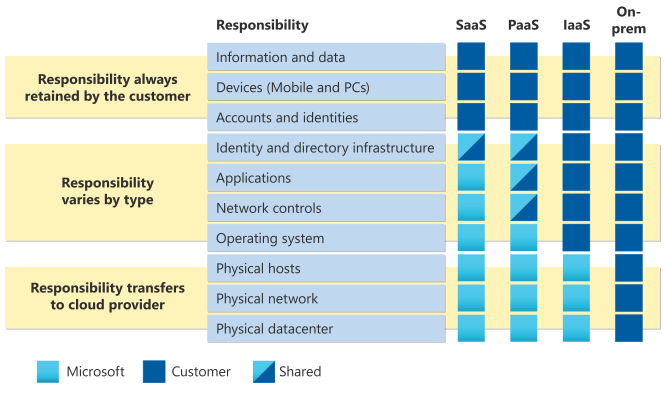
Microsoft provides:
- The platform
- The guard rails
- The tooling
Customers provide:
- Their own risk-aligned configuration
- Monitoring
- Operational recovery planning
It’s a partnership, and like any partnership, both sides have a role to play.
Planning for the conversation you hope you’ll never have
Nobody wants to have those doom-and-gloom cybersecurity discussions. But this one matters, because identity is the centre of your cloud universe. So ask those uncomfortable questions, what would we do, who would respond, and how quickly could we act.
It’s important to plan and ensure you have prevention in place, as prevention is your only true recovery plan.